Text

Text |
|
This section describes how to add a paragraph of text to a Web page, change the appearance of text, and use headings, line breaks, and horizontal rules to change Web page layout.
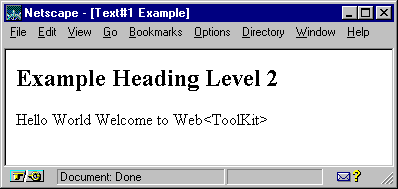
The following example adds a
second level heading with the text "Example Heading Level 2." The
example then adds a line of text "Hello World Welcome to Web<ToolKit>."
The text line is created by adding two text strings to the os_paragraph
object p . The second text string shows how Web<ToolKit>
makes it unnecessary to use cumbersome syntax when inserting special
characters in a Web page.
If you were manually inserting
HTML to display the text string, "Web<ToolKit>," you would
specify " Web<ToolKit> ". With Web<ToolKit>,
you do not have to use character entity references
like " < " to display special
characters. Instead, you simply specify " Web<ToolKit> ."
Web<ToolKit> provides a set of global functions called block format functions that affect the layout of the page. These functions are supported only in Netscape browsers.
One example of a block format
function is os_center() . This function takes an
element as an argument and returns an os_element_group
object containing the element. When the resulting group is displayed, all
contents of the original element are centered in the browser viewing area.
Another block format function is os_paragraph() .
This function adds a line space below the contents of the object.
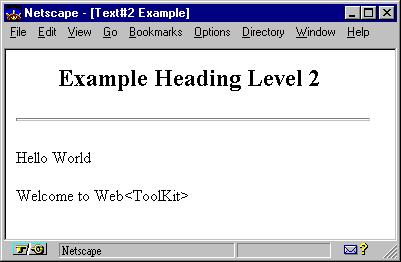
The following example centers the second level heading added in the previous example between the left and right sides of the page and adds a horizontal rule after the heading. The text strings are placed in paragraphs, changing their presentation on the screen.
#include <iostream.h>
#include <ospace/web.h>

int main()
  {
  os_page page( "Text#2 Example" );
  page << os_center( os_heading( 2, "Example Heading Level 2" ) )
       << os_horizontal_rule()
       << os_paragraph( "Hello World" )
       << os_paragraph( "Welcome to Web<ToolKit>" );
  cout << page;
  return 0;
  }
The appearance of text, such as bold or italic , can be controlled through a set of text markup functions. Refer to the Web Reference Manual for a complete list of markup functions. If no markup functions are defined, the text appears according to the defaults of the browser used to view the Web page.
All markup functions return an element group containing a copy of the original element. When the element group is converted to HTML, the appropriate effect is applied to the entire contents of the element group. There are two categories of markup functions: physical and logical. Each of these is described below.
os_element_group
. When you use physical markup functions to affect the appearance of text,
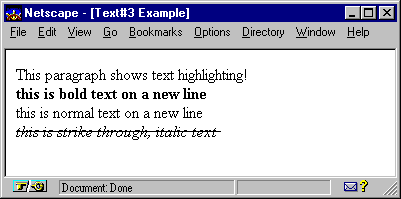
every browser displays the contents in the same way. The following example uses the
physical markup functions os_bold()
, os_italic() , and os_strikeout()
to affect the appearance of text.
#include <iostream.h>
#include <ospace/web.h>

int main()
  {
  os_page page( "Text#3 Example");
  os_paragraph p( "This paragraph shows text highlighting!" );
  p << os_break()
    << os_bold( "this is bold text on a new line" )
    << os_break()
    << "this is normal text on a new line"
    << os_break()
    << os_italic( os_strike( "this is strike through, italic text" ) );

  page << p;
  cout << page;
  return 0;
  }
Copyright©1994-2026 Recursion
Software LLC
All Rights Reserved - For use by licensed users only.