Constructing a Simple Table

Constructing a Simple Table |
|
Use the class os_table
to construct a table and the class os_table_row to
add rows to the table. You can stream text to the individual row cells using any
of the following methods. Each of these methods uses operator<<
to stream in the object.
os_table_header
object into a row.os_table_data
object into a row.os_table_data
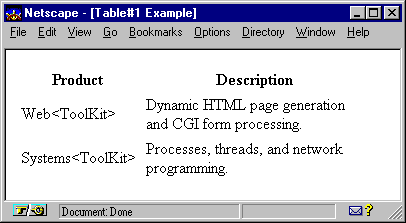
object containing an os_text object. This example constructs a simple
two-column table with 3 rows and adds it to a Web page. The rows are constructed
with the class os_table_row . Each text string or
object becomes an individual cell within the row. The class os_table_header
applies the header format to the contents of both cells in the first row.
#include <iostream.h>
#include <ospace/web.h>

int main()
  {
  os_page page( "Table#1 Example" );

  os_table table;

  os_table_row row1;
  row1 << os_table_header( "Product" )
       << os_table_header( "Description" );

  os_table_row row2;
  row2 << "Web<ToolKit>"
       << "Dynamic HTML page generation and CGI form processing.";

  os_table_row row3;
  row3 << os_table_data( "Systems<ToolKit>" )
       << os_table_data( "Processes, threads, and network programming." );

  table << row1 << row2 << row3;  // assemble table
  page << table;
  cout << page;
  return 0;
  }
The class os_table
provides member functions that affect the appearance of the entire table. For
example, one member function inserts space between the contents and the inside
edge of each cell in the table. The cell padding for an individual cell cannot
be set individually. Refer to Web Reference Manual for a complete list and
description of these functions.
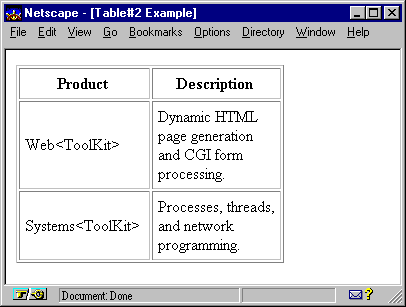
The following example uses the
member function os_table::border() to add a
border to the table constructed in the previous example. The cell padding is
set to five (5) pixels with the member function os_table::cell_padding()
, and the table width is set to 75% of the browser's view area using os_table::width()
.
#include <iostream.h>
#include <ospace/web.h>

int main()
  {
  os_page page( "Table#2 Example" );

  os_table table;
  table.border( 1 ).width( "75%" ).cell_padding( 5 );

  os_table_row row1;
  row1 << os_table_header( "Product" )
       << os_table_header( "Description" );

  os_table_row row2;
  row2 << "Web<ToolKit>"
       << "Dynamic HTML page generation and CGI form processing.";

  os_table_row row3;
  row3 << os_table_data( "Systems<ToolKit>" )
       << os_table_data( "Processes, threads, and network programming." );

  table << row1 << row2 << row3;  // assemble table
  page << table;
  cout << page;
  return 0;
  }
The class os_table_row
has member functions that change the appearance of an entire row. For example,
horizontal and vertical alignment can be set for entire rows using os_table_row
member functions.
The classes os_table_data
and os_table_header have member functions that
change the appearance of individual cells. Alignment specifications set in
individual cells override the alignment set in the containing row. The effects
of the member function are applied to all contents of the cell. One of the
member functions available for individual cells is os_table_data::column_span()
. This member function permits a single cell to span across multiple columns.
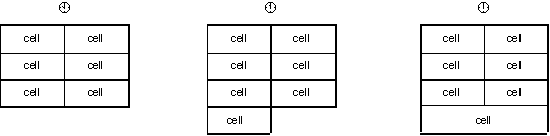
The results of spanning is illustrated in the following example.
The first table, Â
, consists of three rows, each containing two cells. The second table, ì
, results if a fourth row containing only one cell is
added to the table. The third table, ¡ , is
constructed by applying the table layout member function os_table_data::column_span()
to the new cell, stretching the cell across both columns.
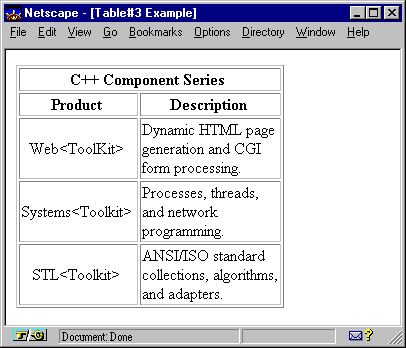
The following example adds two
rows to the table constructed in the previous example. The top row consists of
one cell that spans both columns using os_table_header::column_span()
. Also, the product names are vertically and horizontally centered in their
respective cells using the member function os_table_header::align()
.
#include <iostream.h>
#include <ospace/web.h>

int main()
  {
  os_page page( "Table#3 Example" );

  os_table table;
  table.border( 1 ).width( "75%" );

  os_table_header cell( "C++ Component Series" );
  cell.align( os_table_header::center ).valign( os_table_header::middle );

  os_table_row row1;
  row1 << cell.column_span( 2 );

  os_table_row row2;
  row2 << os_table_header( "Product" )
       << os_table_header( "Description" );

  // Center the product names
  os_table_row row3;
  row3 << os_table_data( "Web<ToolKit>",
                        os_table_data::center, os_table_data::middle )
       << "Dynamic HTML page generation and CGI form processing.";

  os_table_row row4;
  row4 << os_table_data( "Systems<Toolkit>",
                         os_table_data::center, os_table_data::middle )
       << "Processes, threads, and network programming.";

  os_table_row row5;
  row5 << os_table_data( "STL<Toolkit>",
                         os_table_data::center, os_table_data::middle )
       << "ANSI/ISO standard collections, algorithms, and adapters.";

  table << row1 << row2 << row3 << row4 << row5;  // assemble table
  page << table;
  cout << page;
  return 0;
  }
Copyright©1994-2026 Recursion
Software LLC
All Rights Reserved - For use by licensed users only.