Creating Ordered Lists

Creating Ordered Lists |
|
Use the class os_ordered_list
for information that must
be presented in a particular order. Items in the list are displayed in the order
in which they are entered in the list and are preceded by a number.
The type of number (Arabic, Roman)
can be set with the member function os_ordered_list::numbering()
. By default, the numbering starts over at one for each list. However, member
functions can set the start number, as well as continue numbering from previous
blocks of numbers. For example, an ordered list contains items numbered from one
to five. The fifth list item is followed by several paragraphs of text. By
default, the next ordered list begins over at one. Using member functions, this
number can be explicitly set to six, or it can automatically detect the last
number used in the previous sequence and set itself to six.
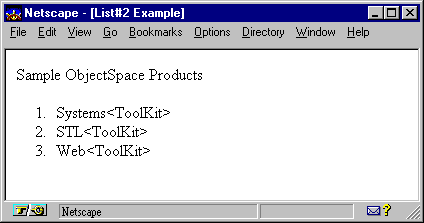
The following example creates an ordered list containing three items preceded by a number: Systems<ToolKit>, STL<ToolKit>, and Web<ToolKit>.
#include <iostream.h>
#include <ospace/web.h>

int main()
  {
  os_page page( "List#2 Example" );

  os_ordered_list list;

  list << "Systems<ToolKit>"
       << "STL<ToolKit>"
       << "Web<ToolKit>";

  page << "Sample Recursion Software Products"
       << list;
  cout << page;
  return 0;
  }
Copyright©1994-2026 Recursion
Software LLC
All Rights Reserved - For use by licensed users only.