Constraint Checking

Constraint Checking |
|
When constraint checking is disabled, a Web page is rendered as HTML, without regard to the constraint rules. However, this output may not comply with HTML standards. The effect this has when the output is viewed in a browser depends on a number of variables, including the type of violation and the browser used.
When constraint checking is enabled, Web pages are also rendered as HTML, no matter what constraint violations they may contain. However, instead of leaving display of the violation up to the browser, Web<ToolKit> renders the Web page in standards-compliant HTML.
The following example renders two Web pages. The first Web page, named page , is rendered with the constraints disabled (default). The second Web page, named constr_page , is rendered with the constraints enabled. With the exception of the page title and a heading indicating the constraint mode, the page contents are the same.
Both Web pages contain a table
with two columns and three rows. The table is built using the class os_table
, which is derived from os_element_group . The text
string "constraint violation" is streamed into the table when the
table is assembled. This is a violation of the constraint rules defined for os_table
. The only type of element that can be added to an os_table
is os_table_row .
When these Web pages are rendered, the violating text string "constraint violation" is handled differently. The two screens below demonstrate these differences.
#include <fstream.h>
#include <ospace/web.h>

int main()
  {
  os_page page( "Constraints1a Example - Constraints Disabled" );
  os_page constr_page( "Constraints1b Example - Constraints Enabled" );

  // the table will have a border, header and 3 product rows
  os_table table;
  table.border( 1 );

  os_table_row headerrow;
  headerrow << os_table_header( "Product" )
            << os_table_header( "Description" );

  os_table_row row1;
  row1 << "Systems<Toolkit>"
       << "Processes, threads, and network programming.";

  os_table_row row2;
  row2 << "STL<Toolkit>"
       << "ANSI/ISO standard collections, algorithms, and adapters.";

  os_table_row row3;
  row3 << "Web<ToolKit>"
       << "Dynamic HTML page generation and CGI form processing.";

  // Assemble table
  table << headerrow
        << row1
        << "constraint violation"
        << row2
        << row3;

  page << os_bold( "Constraints disabled (default):" )
       << os_break()
       << table;

  ofstream f1( "constr1a.html" );
  f1 << page;

  os_element_group::enable_constraints();
  constr_page << os_bold( "Constraints enabled:" )
              << os_break()
              << table;

  ofstream f2( "constr1b.html" );
  f2 << constr_page;

  return 0;
  }
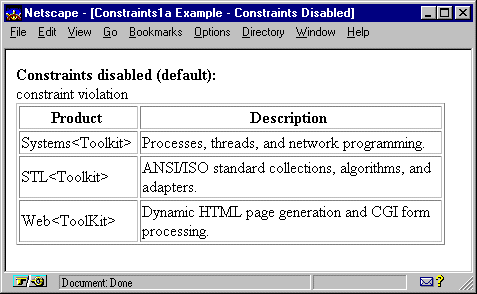
Constraint checking was disabled when the example HTML document constr1a.html was rendered from constr1.cpp. The text string "constraint violation" is added to the table without any table element tags. Because HTML only allows a table to contain table rows, the text string could not be placed in the table.
This page displays differently according to the browser used to view it. In the example screen below, Netscape places the illegal text string above the table.
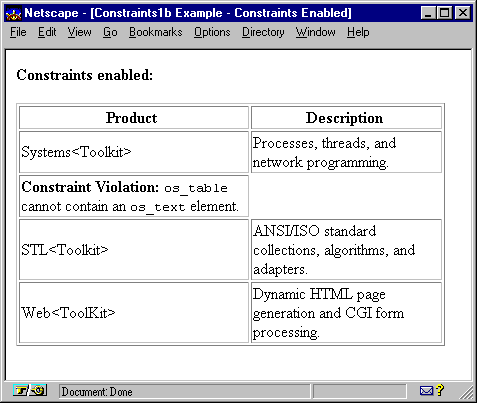
Constraint checking was enabled when the example HTML document constr1b.html was rendered from constr1.cpp. Instead of adding the violating text string "constraint violation" to the Web page, a table data element is added to the table with the following text string:
Constraint Violation: os_table cannot contain an os_text element.
This page displays in a consistent manner, no matter what browser is used to view it. As seen in the example screen below, Web<ToolKit> places the constraint violation message in one cell of the body of the table.
Copyright©1994-2026 Recursion
Software LLC
All Rights Reserved - For use by licensed users only.